Display > Cast/Screen Mirroring တွင်ရှိသည်)။ "]]],["p",{"jc":"left","ind":{},"spacing":{}},["span",{"data-type":"text"},["span",{"data-type":"leaf"},"- AnyCast ၏ WiFi အမည် (ဥပမာ: AnyCast-XXXX) ကိုရွေးပြီး ချိတ်ဆက်ပါ "]]],["p",{"jc":"left","ind":{},"spacing":{}},["span",{"data-type":"text"},["span",{"data-type":"leaf"},"- သို့မဟုတ် **EZMira App** ကို Play Store မှ ဒေါင်းလုဒ်လုပ်ပါ။ "]]],["p",{"jc":"left","ind":{},"spacing":{}},["span",{"data-type":"text"},["span",{"data-type":"leaf"}," - TV ပေါ်ရှိ QR Code ကို ဖုန်းဖြင့် Scan ဖတ်ပြီး App ကို ထည့်သွင်းပါ�。 "]]],["p",{"jc":"left","ind":{},"spacing":{}},["span",{"data-type":"text"},["span",{"data-type":"leaf"}," - EZMira App ဖွင့်ပြီး AnyCast ကို ရွေးချယ်ချိတ်ဆက်ပါ။ "]]],["p",{"jc":"left","ind":{},"spacing":{}},["span",{"data-type":"text"},["span",{"data-type":"leaf"},"4️⃣ **iOS ဖုန်းအတွက် ချိတ်ဆက်နည်း** "]]],["p",{"jc":"left","ind":{},"spacing":{}},["span",{"data-type":"text"},["span",{"data-type":"leaf"},"- ဖုန်းကို AnyCast ၏ WiFi (AnyCast-XXXX) နှင့်ချိတ်ဆက်ပါ "]]],["p",{"jc":"left","ind":{},"spacing":{}},["span",{"data-type":"text"},["span",{"data-type":"leaf"},"- **Airplay** လုပ်ဆောင်ချက်ကိုဖွင့်ပါ (Control Center > Screen Mirroring)။ "]]],["p",{"jc":"left","ind":{},"spacing":{}},["span",{"data-type":"text"},["span",{"data-type":"leaf"},"- AnyCast ကို ရွေးချယ်ပြီး ချိတ်ဆက်ပါ။ "]]],["p",{"jc":"left","ind":{},"spacing":{}},["span",{"data-type":"text"},["span",{"data-type":"leaf"},"5️⃣ **သုံးစွဲခြင်း** "]]],["p",{"jc":"left","ind":{},"spacing":{}},["span",{"data-type":"text"},["span",{"data-type":"leaf"},"- ချိတ်ဆက်ပြီးသည်နှင့် ဖုန်းမျက်နှာပြင်ကို TV ပေါ်တွင် Mirror လုပ်နိုင်ပါပြီ "]]],["p",{"jc":"left","ind":{},"spacing":{}},["span",{"data-type":"text"},["span",{"data-type":"leaf"},"- ဗီဒီယို၊ ဓာတ်ပုံ၊ ဂိမ်း သို့မဟုတ် တင်ဆက်မှုများကို ကြည့်ရှုရန် အဆင်သင့်ဖြစ်ပါပြီ! "]]],["p",{"jc":"left","ind":{},"spacing":{}},["span",{"data-type":"text"},["span",{"data-type":"leaf"}," **အကြံပြုချက်**: "]]],["p",{"jc":"left","ind":{},"spacing":{}},["span",{"data-type":"text"},["span",{"data-type":"leaf"},"- တည်ငြိမ်သော ချိတ်ဆက်မှုအတွက် WiFi အား အနှောင့်အယှက်နည်းသော နေရာတွင်ထားပါ။ "]]],["p",{"jc":"left","ind":{},"spacing":{}},["span",{"data-type":"text"},["span",{"data-type":"leaf"},"- ပြဿနာရှိပါက AnyCast ၏ WiFi Signal ကို ပြန်စစ်ဆေးပါ။ "]]],["p",{"jc":"left","ind":{},"spacing":{}},["span",{"data-type":"text"},["span",{"data-type":"leaf"},""]]],["p",{"jc":"left","ind":{},"spacing":{}},["span",{"data-type":"text"},["span",{"data-type":"leaf"}," **ပါဝင်ပစ္စည်းများ**: "]]],["p",{"jc":"left","ind":{},"spacing":{}},["span",{"data-type":"text"},["span",{"data-type":"leaf"},"- AnyCast M9 Plus Wireless WiFi Display Receiver "]]],["p",{"jc":"left","ind":{},"spacing":{}},["span",{"data-type":"text"},["span",{"data-type":"leaf"},"- USB Power Lid With IR "]]],["p",{"jc":"left","ind":{},"spacing":{}},["span",{"data-type":"text"},["span",{"data-type":"leaf"},"- English User Manual "]]],["p",{"jc":"left","ind":{},"spacing":{}},["span",{"data-type":"text"},["span",{"data-type":"leaf"},""]]],["p",{"jc":"left","ind":{},"spacing":{}},["span",{"data-type":"text"},["span",{"data-type":"leaf"}," **အသုံးပြုနည်း**: "]]],["p",{"jc":"left","ind":{},"spacing":{}},["span",{"data-type":"text"},["span",{"data-type":"leaf"},"Android အတွက် Miracast ဖွင့်ပြီး AnyCast ကို ရွေးချယ်ပါ။ မသိရင် EZMira App ကို QR Code ဖတ်ပြီး ဒေါင်းလုဒ်လုပ်ပြီး လွယ်ကူစွာ ချိတ်ဆက်လိုက်ပါ! "]]],["p",{"jc":"left","ind":{},"spacing":{}},["span",{"data-type":"text"},["span",{"data-type":"leaf"},""]]],["p",{"jc":"left","ind":{},"spacing":{}},["span",{"data-type":"text"},["span",{"data-type":"leaf"}," အိမ်မှာ ရုပ်ရှင်ကြည့်ခြင်း၊ ဂိမ်းဆော့ခြင်း၊ တင်ဆက်မှုပြုလုပ်ဖို့ အထူးသင့်တော်ပါတယ်! "]]],["p",{"jc":"left","ind":{},"spacing":{}},["span",{"data-type":"text"},["span",{"data-type":"leaf"},""]]],["p",{"jc":"left","ind":{},"spacing":{}},["span",{"data-type":"text"},["span",{"data-type":"leaf"}," အခုပဲ ဆက်သွယ်ပြီး မှာယူလိုက်ပါ! "]]],["p",{"jc":"left","ind":{},"spacing":{}},["span",{"data-type":"text"},["span",{"data-type":"leaf"},"#AnyCastM9Plus #WirelessTVStick #SmartTV #Miracast #Airplay #DLNA #TechGadgets #MyanmarTech #1080PHD #HomeEntertainment"]]],["p",{"jc":"center","ind":{},"spacing":{}},["span",{"data-type":"text"},["span",{"color":"rgb(0, 0, 0)","sz":12,"szUnit":"pt","data-type":"leaf"},"AnyCast M9 plus TV Stick miracast Airplay HD 1080P Wireless WiFi Display Receiver Dongle HDMI TV Stick"]]],["p",{"jc":"left","ind":{},"spacing":{}},["span",{"data-type":"text"},["span",{"color":"rgb(0, 0, 0)","sz":12,"szUnit":"pt","data-type":"leaf"},"Description:"]]],["p",{"jc":"left","ind":{},"spacing":{}},["span",{"data-type":"text"},["span",{"color":"rgb(0, 0, 0)","sz":10,"szUnit":"pt","data-type":"leaf"},"Item type:Wireless WiFi Display Receiver"]]],["p",{"jc":"left","ind":{},"spacing":{}},["span",{"data-type":"text"},["span",{"color":"rgb(0, 0, 0)","sz":10,"szUnit":"pt","data-type":"leaf"},"Power Comsumption: Main unit ≤ 750mA@5V"]]],["p",{"jc":"left","ind":{},"spacing":{}},["span",{"data-type":"text"},["span",{"color":"rgb(0, 0, 0)","sz":10,"szUnit":"pt","data-type":"leaf"},"Functions: Miracast DLNA Airplay"]]],["p",{"jc":"left","ind":{},"spacing":{}},["span",{"data-type":"text"},["span",{"color":"rgb(0, 0, 0)","sz":10,"szUnit":"pt","data-type":"leaf"},"Miracast: Android Wi-Fi Display (Miracast)"]]],["p",{"jc":"left","ind":{},"spacing":{}},["span",{"data-type":"text"},["span",{"color":"rgb(0, 0, 0)","sz":10,"szUnit":"pt","data-type":"leaf"},"DDR3: 128MB"]]],["p",{"jc":"left","ind":{},"spacing":{}},["span",{"data-type":"text"},["span",{"color":"rgb(0, 0, 0)","sz":10,"szUnit":"pt","data-type":"leaf"},"NOR flash: 128M Bytes"]]],["p",{"jc":"left","ind":{},"spacing":{}},["span",{"data-type":"text"},["span",{"color":"rgb(0, 0, 0)","sz":10,"szUnit":"pt","data-type":"leaf"},"WiFi: IEEE 802.11 b/g/n (Built-in Realtek 8188 USB WiFi Module)"]]],["p",{"jc":"left","ind":{},"spacing":{}},["span",{"data-type":"text"},["span",{"color":"rgb(0, 0, 0)","sz":10,"szUnit":"pt","data-type":"leaf"},"CPU: RK3036"]]],["p",{"jc":"left","ind":{},"spacing":{}},["span",{"data-type":"text"},["span",{"color":"rgb(0, 0, 0)","sz":10,"szUnit":"pt","data-type":"leaf"},"Airplay:To support IOS airplay mirroring"]]],["p",{"jc":"left","ind":{},"spacing":{}},["span",{"data-type":"text"},["span",{"color":"rgb(0, 0, 0)","sz":10,"szUnit":"pt","data-type":"leaf"},"DLNA: Digital Living Network Alliance"]]],["p",{"jc":"left","ind":{},"spacing":{}},["span",{"data-type":"text"},["span",{"color":"rgb(0, 0, 0)","sz":10,"szUnit":"pt","data-type":"leaf"},"Phone Model:Support Most Smart phone"]]],["p",{"jc":"left","ind":{},"spacing":{}},["span",{"data-type":"text"},["span",{"color":"rgb(0, 0, 0)","sz":10,"szUnit":"pt","data-type":"leaf"},"Video Player: MPEG2, MPEG4, AVI, WMV, MKV, MOV, RM, RMVB"]]],["p",{"jc":"left","ind":{},"spacing":{}},["span",{"data-type":"text"},["span",{"color":"rgb(0, 0, 0)","sz":10,"szUnit":"pt","data-type":"leaf"},"Music: MP3, WMA, WAV, OGG, AAC, FLAC, 3GP"]]],["p",{"jc":"left","ind":{},"spacing":{}},["span",{"data-type":"text"},["span",{"color":"rgb(0, 0, 0)","sz":10,"szUnit":"pt","data-type":"leaf"},"Chip: RK30/RK31; Allwinner A31"]]],["p",{"jc":"left","ind":{},"spacing":{}},["span",{"data-type":"text"},["span",{"color":"rgb(0, 0, 0)","sz":10,"szUnit":"pt","data-type":"leaf"},"OS: Android 4.2 castrated version"]]],["p",{"jc":"left","ind":{},"spacing":{}},["span",{"data-type":"text"},["span",{"color":"rgb(0, 0, 0)","sz":10,"szUnit":"pt","data-type":"leaf"},"Gallery:JPG, BMP, PNG"]]],["p",{"jc":"left","ind":{},"spacing":{}},["span",{"data-type":"text"},["span",{"color":"rgb(0, 0, 0)","sz":12,"szUnit":"pt","data-type":"leaf"},"Package includes:"]]],["p",{"jc":"left","ind":{},"spacing":{}},["span",{"data-type":"text"},["span",{"color":"rgb(0, 0, 0)","sz":10,"szUnit":"pt","data-type":"leaf"},"1 x M9 Plus Wireless WiFi Display Receiver"]]],["p",{"jc":"left","ind":{},"spacing":{}},["span",{"data-type":"text"},["span",{"color":"rgb(0, 0, 0)","sz":10,"szUnit":"pt","data-type":"leaf"},"1 x USB Power Lid With IR"]]],["p",{"jc":"left","ind":{},"spacing":{}},["span",{"data-type":"text"},["span",{"color":"rgb(0, 0, 0)","sz":10,"szUnit":"pt","data-type":"leaf"},"1 x English User Manual"]]],["p",{"jc":"left","ind":{},"spacing":{}},["span",{"data-type":"text"},["span",{"data-type":"leaf"},""]],["img",{"src":"https://static-01.shop.com.mm/p/2ecc991b98a44f861c3eda5075c68cb6.jpg","style":"width: 664.0px;height: 1500.0px;display: inline;vertical-align: middle;","width":664,"height":1500},["span",{"data-type":"text"},["span",{"data-type":"leaf"},""]]],["span",{"data-type":"text"},["span",{"data-type":"leaf"},""]],["img",{"src":"https://static-01.shop.com.mm/p/a27707d602cc787f4acf341c2e400bdb.jpg","style":"width: 1108.0px;height: 1099.0px;display: inline;vertical-align: middle;","width":1108,"height":1099},["span",{"data-type":"text"},["span",{"data-type":"leaf"},""]]],["span",{"data-type":"text"},["span",{"data-type":"leaf"},""]]],["p",{"jc":"left","ind":{},"spacing":{}},["span",{"data-type":"text"},["span",{"data-type":"leaf"},""]],["img",{"src":"https://static-01.shop.com.mm/p/5d52e523fbbfe970e8e639b5df09a2b6.jpg","style":"width: 498.0px;height: 499.0px;display: inline;vertical-align: middle;","width":498,"height":499},["span",{"data-type":"text"},["span",{"data-type":"leaf"},""]]],["span",{"data-type":"text"},["span",{"data-type":"leaf"},""]],["img",{"src":"https://static-01.shop.com.mm/p/5103361e85f5af03dde04220203015c6.jpg","style":"width: 1064.0px;height: 1063.0px;display: inline;vertical-align: middle;","width":1064,"height":1063},["span",{"data-type":"text"},["span",{"data-type":"leaf"},""]]],["span",{"data-type":"text"},["span",{"data-type":"leaf"},""]]],["p",{"jc":"left","ind":{},"spacing":{}},["span",{"data-type":"text"},["span",{"data-type":"leaf"},""]],["img",{"src":"https://static-01.shop.com.mm/p/9d955b289edc3d17486b5208a0a900ea.jpg","style":"width: 800.0px;height: 800.0px;display: inline;vertical-align: middle;","width":800,"height":800},["span",{"data-type":"text"},["span",{"data-type":"leaf"},""]]],["span",{"data-type":"text"},["span",{"data-type":"leaf"},""]],["img",{"src":"https://static-01.shop.com.mm/p/1ee6c36c2e7993d315bdcf7a98521a50.jpg","style":"width: 800.0px;height: 800.0px;display: inline;vertical-align: middle;","width":800,"height":800},["span",{"data-type":"text"},["span",{"data-type":"leaf"},""]]],["span",{"data-type":"text"},["span",{"data-type":"leaf"},""]],["img",{"src":"https://static-01.shop.com.mm/p/4c49455947a9fec976bbe1c9fa22ebb3.jpg","style":"width: 1001.0px;height: 1001.0px;display: inline;vertical-align: middle;","width":1001,"height":1001},["span",{"data-type":"text"},["span",{"data-type":"leaf"},""]]],["span",{"data-type":"text"},["span",{"data-type":"leaf"},""]]],["p",{"jc":"left","ind":{},"spacing":{}},["span",{"data-type":"text"},["span",{"data-type":"leaf"},""]]],["p",{"jc":"left","ind":{},"spacing":{}},["span",{"data-type":"text"},["span",{"data-type":"leaf"},""]]]]">
AnyCast M9 Plus TV Stick နဲ့ သင့်ဖုန်းကို Smart TV အဖြစ်ပြောင်းလဲလိုက်ပါ! ✨
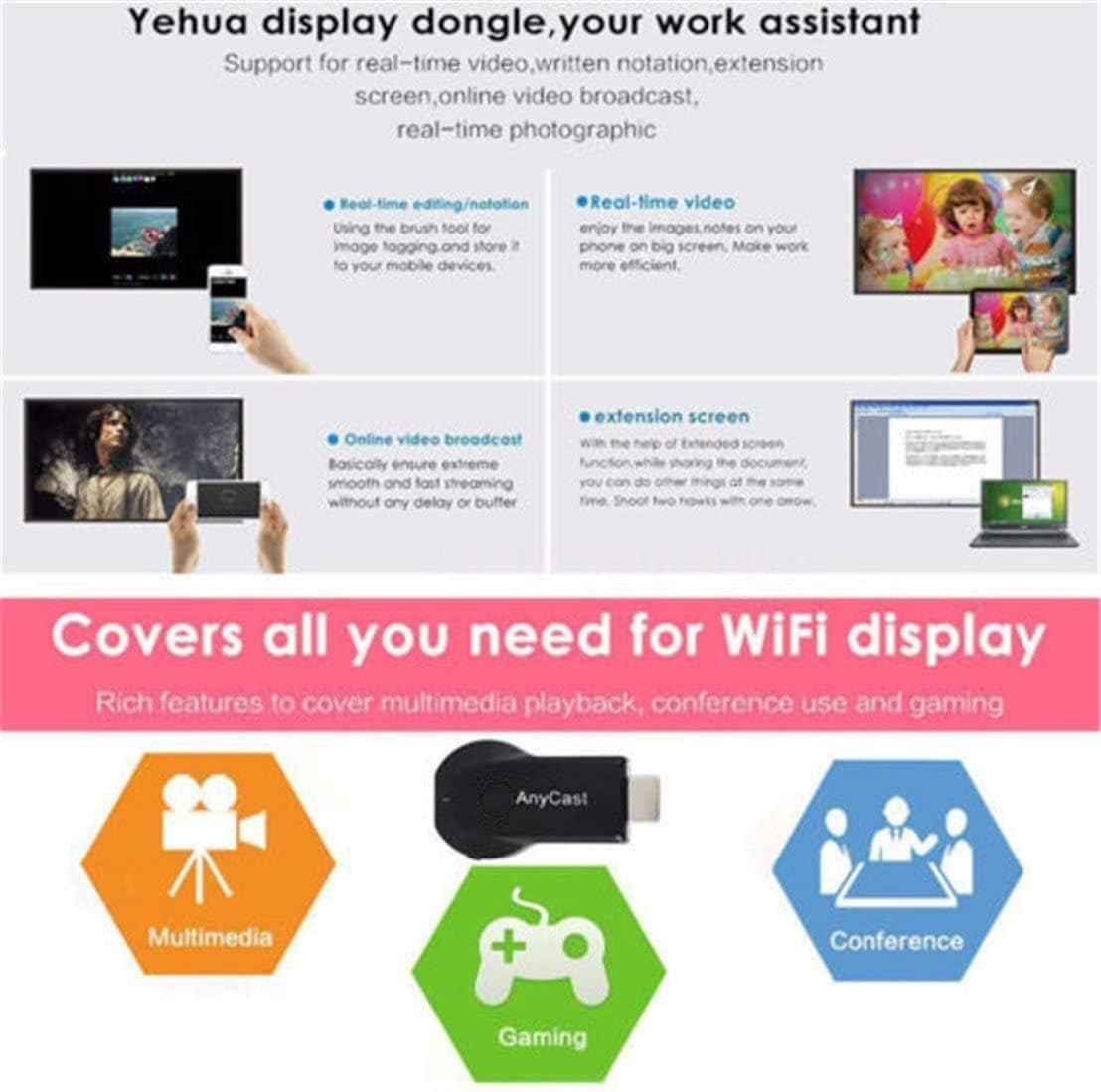
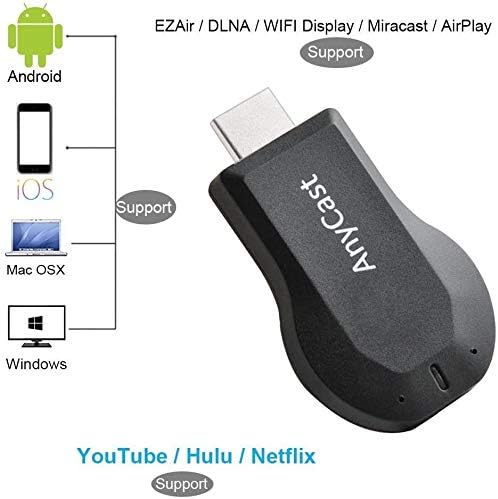
သင့်ဖုန်း၊ တက်ဘလက် သို့မဟုတ် MacBook မှ ဗီဒီယို၊ ဓာတ်ပုံ၊ ရုပ်ရှင်များကို TV သို့မဟုတ် Projector ပေါ်သို့ Wireless ဖြင့် ဖွင့်ပြလို့ရပြီ! ➡️ Airplay၊ Miracast၊ DLNA နည်းပညာများနဲ့ အဆင်ပြေစွာ အသုံးပြုနိုင်ပါတယ်!
**အင်္ဂါရပ်များ**:
✅ 1080P HD ရုပ်ထွက်အရည်အသွေး
✅ iOS 9.0+/ Android 5.0+ နဲ့ အဆင်ပြေ
✅ EZMira App ဖြင့် လွယ်ကူစွာ ချိတ်ဆက်နိုင်
✅ Video Player: MPEG2, MPEG4, AVI, WMV, MKV, MOV, RM, RMVB
✅ Music: MP3, WMA, WAV, OGG, AAC, FLAC, 3GP
✅ Gallery: JPG, BMP, PNG
✅ CPU: RK3036 | DDR3: 128MB | WiFi: IEEE 802.11 b/g/n
AnyCast M9 Plus TV Stick ချိတ်ဆက်နည်း အဆင့်ဆင့် ➡️
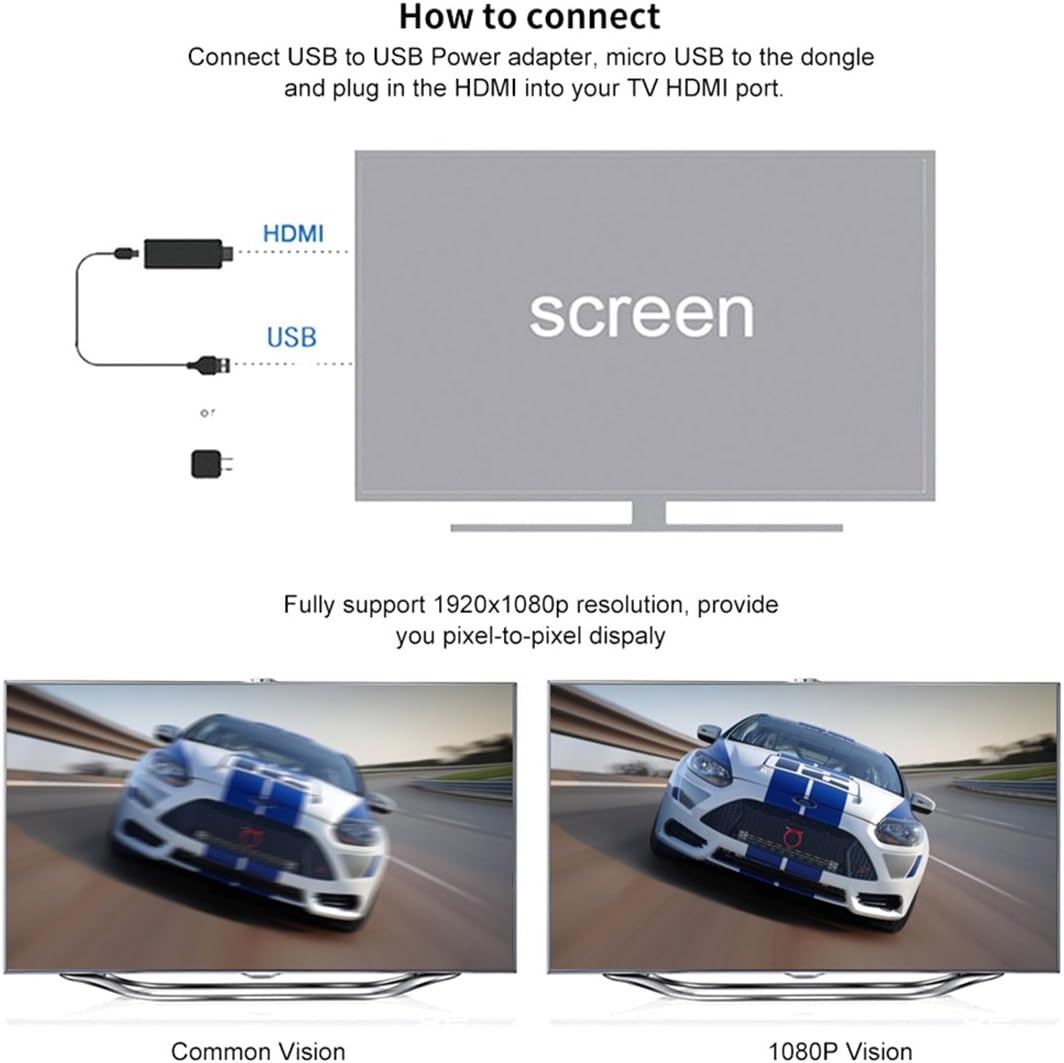
1️⃣ **စက်ပစ္စည်းပြင်ဆင်ခြင်း**
- AnyCast M9 Plus ကို TV ရှိ HDMI Port တွင် တပ်ဆင်ပါ။
- USB Power Lid ကို TV ရှိ USB Port သို့မဟုတ် Power Adapter ဖြင့် ချိတ်ဆက်ပြီး ပါဝါပေးပါ⚡️
2️⃣ **TV ပြင်ဆင်ခြင်း**
- TV ကို ဖွင့်ပြီး HDMI Input သို့ပြောင်းပါ (ဥပမာ: HDMI 1/2)။
- AnyCast ၏ Home Screen ပေါ်လာပါမည်။ QR Code နှင့် WiFi အချက်အလက်များကို မှတ်သားထားပါ
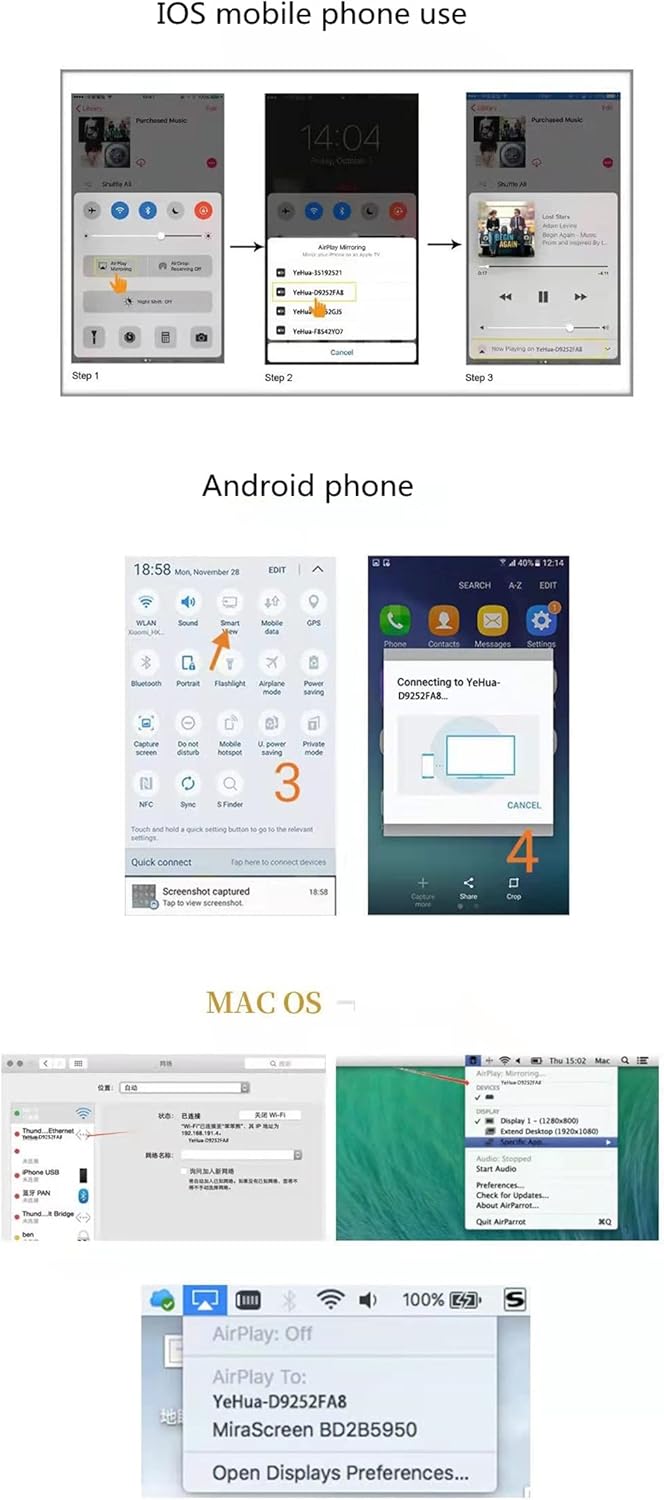
3️⃣ **Android ဖုန်းအတွက် ချိတ်ဆက်နည်း**
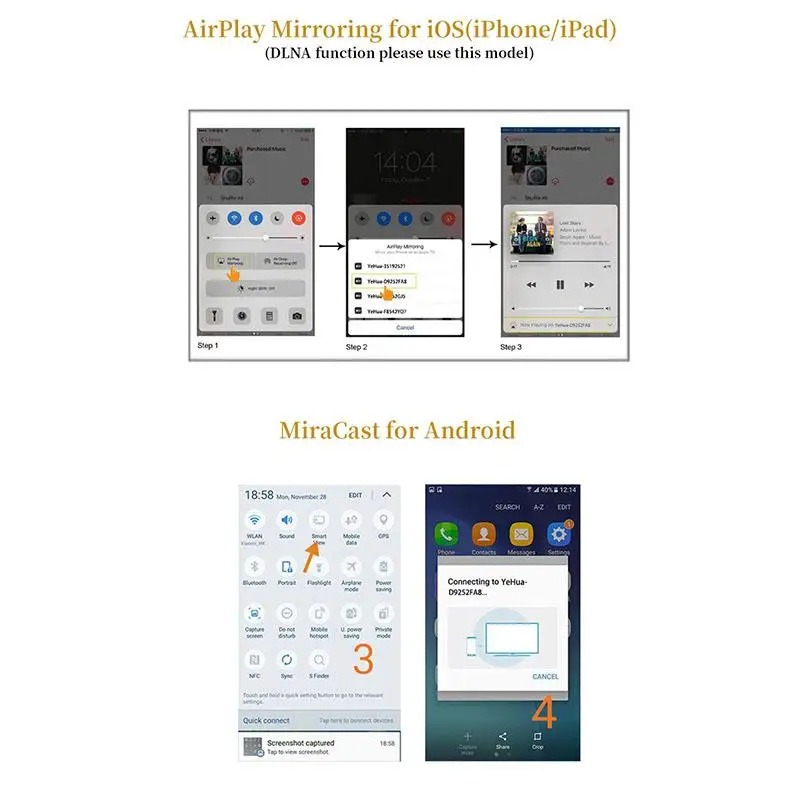
- ဖုန်းတွင် **Miracast** လုပ်ဆောင်ချက်ကိုဖွင့်ပါ (များသောအားဖြင့် Settings > Display > Cast/Screen Mirroring တွင်ရှိသည်)။
- AnyCast ၏ WiFi အမည် (ဥပမာ: AnyCast-XXXX) ကိုရွေးပြီး ချိတ်ဆက်ပါ
- သို့မဟုတ် **EZMira App** ကို Play Store မှ ဒေါင်းလုဒ်လုပ်ပါ။
- TV ပေါ်ရှိ QR Code ကို ဖုန်းဖြင့် Scan ဖတ်ပြီး App ကို ထည့်သွင်းပါ�。
- EZMira App ဖွင့်ပြီး AnyCast ကို ရွေးချယ်ချိတ်ဆက်ပါ။
4️⃣ **iOS ဖုန်းအတွက် ချိတ်ဆက်နည်း**
- ဖုန်းကို AnyCast ၏ WiFi (AnyCast-XXXX) နှင့်ချိတ်ဆက်ပါ
- **Airplay** လုပ်ဆောင်ချက်ကိုဖွင့်ပါ (Control Center > Screen Mirroring)။
- AnyCast ကို ရွေးချယ်ပြီး ချိတ်ဆက်ပါ။
5️⃣ **သုံးစွဲခြင်း**
- ချိတ်ဆက်ပြီးသည်နှင့် ဖုန်းမျက်နှာပြင်ကို TV ပေါ်တွင် Mirror လုပ်နိုင်ပါပြီ
- ဗီဒီယို၊ ဓာတ်ပုံ၊ ဂိမ်း သို့မဟုတ် တင်ဆက်မှုများကို ကြည့်ရှုရန် အဆင်သင့်ဖြစ်ပါပြီ!
**အကြံပြုချက်**:
- တည်ငြိမ်သော ချိတ်ဆက်မှုအတွက် WiFi အား အနှောင့်အယှက်နည်းသော နေရာတွင်ထားပါ။
- ပြဿနာရှိပါက AnyCast ၏ WiFi Signal ကို ပြန်စစ်ဆေးပါ။
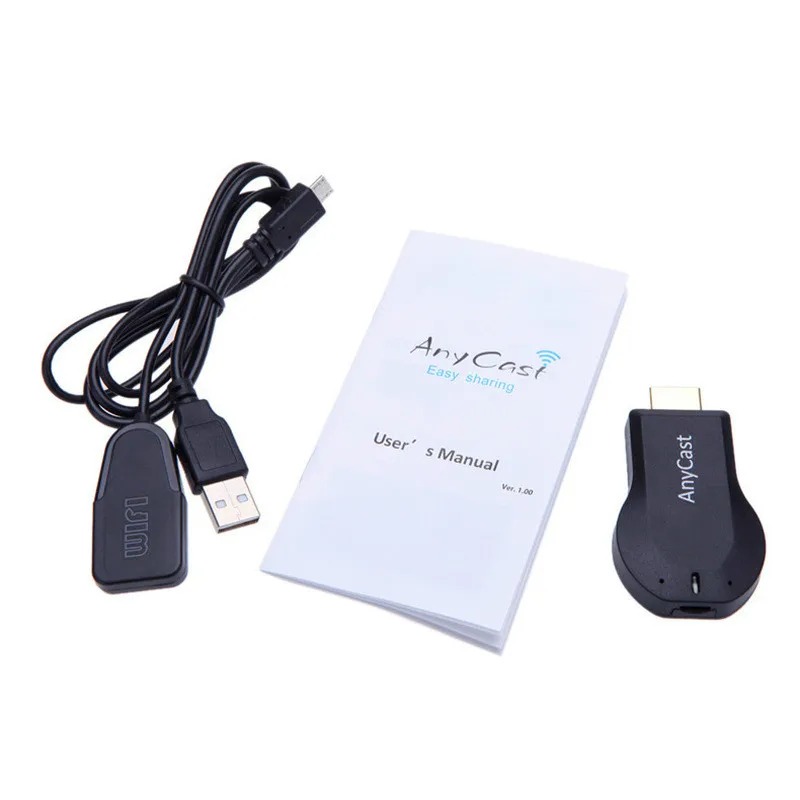
**ပါဝင်ပစ္စည်းများ**:
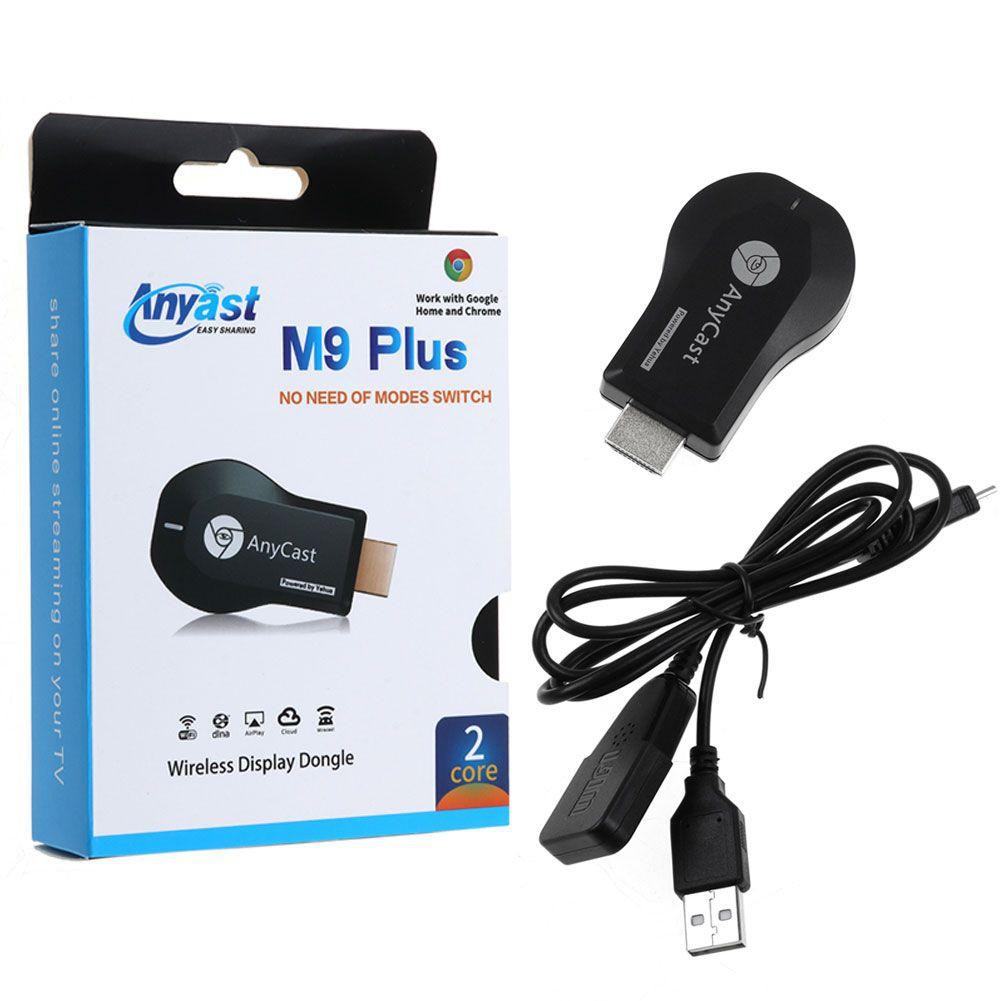
- AnyCast M9 Plus Wireless WiFi Display Receiver
- USB Power Lid With IR
- English User Manual
**အသုံးပြုနည်း**:
Android အတွက် Miracast ဖွင့်ပြီး AnyCast ကို ရွေးချယ်ပါ။ မသိရင် EZMira App ကို QR Code ဖတ်ပြီး ဒေါင်းလုဒ်လုပ်ပြီး လွယ်ကူစွာ ချိတ်ဆက်လိုက်ပါ!
အိမ်မှာ ရုပ်ရှင်ကြည့်ခြင်း၊ ဂိမ်းဆော့ခြင်း၊ တင်ဆက်မှုပြုလုပ်ဖို့ အထူးသင့်တော်ပါတယ်!
အခုပဲ ဆက်သွယ်ပြီး မှာယူလိုက်ပါ!
#AnyCastM9Plus #WirelessTVStick #SmartTV #Miracast #Airplay #DLNA #TechGadgets #MyanmarTech #1080PHD #HomeEntertainment
AnyCast M9 plus TV Stick miracast Airplay HD 1080P Wireless WiFi Display Receiver Dongle HDMI TV Stick
Description:
Item type:Wireless WiFi Display Receiver
Power Comsumption: Main unit ≤ 750mA@5V
Functions: Miracast DLNA Airplay
Miracast: Android Wi-Fi Display (Miracast)
DDR3: 128MB
NOR flash: 128M Bytes
WiFi: IEEE 802.11 b/g/n (Built-in Realtek 8188 USB WiFi Module)
CPU: RK3036
Airplay:To support IOS airplay mirroring
DLNA: Digital Living Network Alliance
Phone Model:Support Most Smart phone
Video Player: MPEG2, MPEG4, AVI, WMV, MKV, MOV, RM, RMVB
Music: MP3, WMA, WAV, OGG, AAC, FLAC, 3GP
Chip: RK30/RK31; Allwinner A31
OS: Android 4.2 castrated version
Gallery:JPG, BMP, PNG
Package includes:
1 x M9 Plus Wireless WiFi Display Receiver
1 x USB Power Lid With IR
1 x English User Manual

 English (US)
 Português
 العربية